ERP integrations can be a great way to customize your system to fit your company’s processes better – but they’re not always the best solution.
“Reduce complexity through standardization.”
Every company has a moment when someone says: “We just need to connect this system to the ERP.”
It may sound simple. The sales team wants its preferred CRM connected. The warehouse needs a carrier link. Production wants to receive product data from CAD software. Finance wants invoices from another platform. The online shop needs live stock and prices.
Sometimes, integration is exactly the right answer.
But sometimes it creates a new layer of complexity that nobody fully owns. Data starts moving in different directions. Customer names exist in several systems. Stock figures do not match. An update in one system overwrites information in another. A small change in an external platform suddenly breaks an important process.
The problem is rarely just technical.
Integrating computer systems is not the same as integrating a business. A successful integration needs clear processes, clear ownership, reliable data, and a reason that is stronger than “this is the tool our team already knows.”
The First Question Is Not “Can We Integrate It?”
Most modern systems can be connected through an API, data export, file exchange, or custom interface.
The better question is: Should they be connected?
An integration is worthwhile when it removes real manual work, improves data accuracy, creates useful information, or supports a process the ERP cannot reasonably handle on its own.
For example, an e-commerce shop may need to send online orders into the ERP automatically. A carrier integration may need to receive delivery details and return a tracking number. A CAD system may need to pass bills of materials and technical routing information into production planning. These are practical connections with a clear business purpose.
But not every request needs an integration.
Sometimes a team asks for an external tool because they are unfamiliar with the ERP’s existing functions. Sometimes an Excel file is used because it feels easier than learning the system. Sometimes a company wants to rebuild every old habit inside new software instead of improving the process.
That is how businesses end up with expensive technology that still depends on private spreadsheets, manual workarounds, and people who “know how it really works.”
Start With the ERP You Already Have
Before adding another system, the company should understand what its ERP can already do.
Modern ERP systems are far more flexible than many people expect. They can often handle customer records, sales pipelines, purchasing approvals, warehouse management, price lists, production orders, quality checks, reporting, document generation, workflow automation, user permissions, and dashboards without needing a separate tool for each task.
The issue is often not missing functionality. It is missing knowledge.
Employees may say, “The ERP cannot do this,” when the real answer is, “We do not yet know how to configure or use this function.” There is no problem with asking for help. In fact, consulting an ERP expert before building an integration is usually the least expensive path.
A good ERP consultant will first look for ways to solve the problem inside the existing system. They may suggest better workflows, configuration, reports, custom fields, permissions, dashboards, or existing modules.
This keeps the business simpler. It also protects the company from creating another system that needs licenses, support, updates, training, data synchronization, and troubleshooting.
Software Should Support the Business — but the Business Must Also Use the Software
There is a common saying: “Software should work for us, not the other way around.”
That is true, but it is often misunderstood.
A business should not be forced into a process that makes no sense. At the same time, not every existing process deserves to be copied exactly into the new ERP system.
Some processes exist only because the old systems were weak. A person may manually copy orders from email to Excel because there was no better tool. Another person may keep a private price list because stock and prices were not connected. A manager may demand a weekly report because real-time information was unavailable.
When an ERP is introduced, these old workarounds should be questioned.
The goal is not to make employees serve the software. The goal is to use the software to create a more reliable, more efficient way of working.
The Risk of Creating a “Frankenstein” System
A business can slowly create a technology landscape that looks impressive from the outside but is difficult to operate inside.
There is a CRM for leads, an Excel file for pricing, a warehouse tool for stock, a separate planning tool for production, an online shop, an accounting platform, a transport portal, a custom app, and several personal reports stored on local computers.
Each tool may be useful on its own. Together, they can create confusion.
The company starts spending time checking which system is correct. Sales sees one stock level, the warehouse sees another, and finance sees a third. Employees have to enter information more than once. Reports need manual corrections. When a key employee leaves, nobody knows which file controls the process.
This is not digital transformation. It is digital fragmentation.
A strong ERP should act as the central business platform. It does not need to replace every specialist application, but it should be the place where core business information comes together.
Decide Which System Owns the Data
Every integration needs a clear answer to one critical question: Which system owns which data?
This is sometimes called the “system of record” or the “master system.”
For example, the ERP may own customer account data, product codes, prices, stock levels, purchase orders, invoices, and financial records. An online shop may display product information and collect customer orders, but it should not freely change central stock or pricing data. A carrier system may manage delivery routes and tracking, but shipment information should return to the ERP. A CAD system may own technical designs, while the ERP owns the approved product structure, materials, costs, and production process.
Without clear ownership, systems can begin to overwrite each other.
Imagine a customer changes their address in the online shop while the sales team updates it in the CRM. Which address is correct? If both systems are allowed to update each other automatically, the result may depend only on which update happens last.
This is why a good integration design is not simply about moving data. It is about controlling data.
The universe runs on physics. Your business runs on SIX ERP.
Good Integrations Remove Work That Adds No Value
The strongest integrations remove manual tasks that are repeated, error-prone, and necessary.
An e-commerce integration can send online orders directly to the ERP. This prevents employees from retyping customer details, products, delivery addresses, and order lines. The ERP can then update stock, create picking tasks, prepare invoices, and support delivery.
A carrier integration can send shipping information to_ a delivery provider and return tracking numbers, labels, transport charges, and delivery status. The customer receives better information, while the warehouse avoids entering the same data into several systems.
A CAD integration can transfer approved bills of materials, routings, and technical product information into the ERP. This reduces the risk that production works with an outdated drawing or manually typed material list.
A supplier or supply-chain integration can receive order confirmations, expected delivery dates, and status updates. This helps purchasing and production plan more reliably.
In each case, the integration has a clear job. It moves specific information at the right time and supports one defined business process.
Reports Are Not Always an Integration Problem
Many integration requests begin with a reporting question.
A manager may say, “I need this data in Excel,” or “The ERP does not show the report I want.” This does not always mean a new external system is needed.
Most ERP systems can provide dashboards, filters, exports, and Business Intelligence views. Data can be presented in real time on screen instead of being printed or manually copied into reports.
Excel can still be useful as a presentation and analysis tool. It is often a good place to review data, create a one-time analysis, or work with a controlled export. The danger starts when Excel becomes the hidden master database.
Data should come from the ERP into Excel for analysis. It should not be changed in Excel and then become a competing version of the business truth.
SIX ERP can provide role-based dashboards and Business Intelligence reporting, helping managers see sales, stock, purchasing, production, finance, and operational data without relying on disconnected reports.
Use Configuration Before Custom Development
A well-designed ERP should allow practical configuration.
This may include custom fields, approval workflows, document templates, user permissions, reports, dashboards, status rules, price structures, process steps, and module settings. These tools allow the business to adapt the system without changing the core software code.
This is different from deep custom development.
Custom development can be useful when the business has a real special requirement that cannot be solved through standard functions, configuration, or an existing module. But it should be treated carefully.
Every custom function creates a long-term responsibility. It must be tested, documented, maintained, secured, and reviewed when the ERP is updated. If the company makes too many uncontrolled changes, it can create a unique system that becomes difficult and expensive to maintain.
The best approach is to standardize wherever possible, configure where it adds value, and develop custom functions only where the business benefit is clear.
An Integration Should Be Designed Like a Business Process
A successful integration begins with a process map, not with an API key.
The company should understand what event starts the process, what data needs to move, where it comes from, where it goes, who is responsible, and what happens if something fails.
For example, an e-commerce order may enter the ERP only after payment is confirmed. The ERP may then check stock and create a picking task. If stock is unavailable, the customer should receive a clear status instead of a false delivery promise. If the address is incomplete, the order may need manual review. If the carrier system does not respond, the warehouse must know what to do next.
These are business decisions. The technical connection supports them.
The integration should also include logging and monitoring. If data fails to move, the company needs to know quickly. An interface that fails silently is dangerous because the business may continue working with incomplete information without realizing it.
Keep the First Version Small and Controlled
An integration does not need to transfer every available data field on the first day.
In fact, trying to move too much data too quickly is one of the most common ways to create unnecessary complexity.
Start with the information that is truly needed. For an online shop, this may be products, prices, stock availability, customers, orders, deliveries, and tracking details. Later, if there is a real benefit, the business can add returns, promotions, loyalty information, advanced product attributes, or customer-specific rules.
A smaller first version is easier to test, easier to understand, and easier to improve. Once it works reliably, the company can expand it based on real business needs.
The ERP Expert Must Be Part of the Decision
When a company considers a new integration, the ERP expert should be involved early.
They understand the existing data structure, available modules, user permissions, workflows, reporting tools, and technical possibilities. They can help identify whether the requested function already exists, whether a process can be simplified, or whether an interface is truly necessary.
The external system expert is also important. A good integration requires knowledge from both sides.
But the central business system should guide the design. If the ERP is the system of record for core operations, it must remain stable, understandable, and protected from uncontrolled data changes.
A deeper look at “software fit”
Common wisdom says that non-custom software will only be a 90% “fit” (at best) for an organization. Therefore, it’s logical to assume that many companies would need third-party ERP integrations to cover the gaps with the fit. But being common wisdom doesn’t make it right. Here are the areas that need to be explored before you consider integrating another solution into your ERP:
Get educated on existing software functionality. It’s dangerous to look for an outside solution if you don’t fully understand the ERP you are currently running. You bought an ERP system because you wanted an integrated solution. Don’t start recreating your past environment with integrations. Remember, just because you or your team don’t understand how to solve a business problem in the ERP, doesn’t mean it can’t be solved. There is no shame in lacking subject matter expertise in the ERP. Using a spreadsheet or another solution that you or your group understand is tempting, but there are low odds of this being the best solution in the long run. Reach out to an expert to help guide you to a solution within your existing ERP. It’s the cheapest path in the long run.
Adapt your procedures to the software. There’s an old saying, “Software should work for us, not the other way around.” This statement is true, but adapting your processes to the software’s functionality doesn’t mean you work for the software; it means you use it! It’s about increasing the efficiency of your business.
Final Thoughts
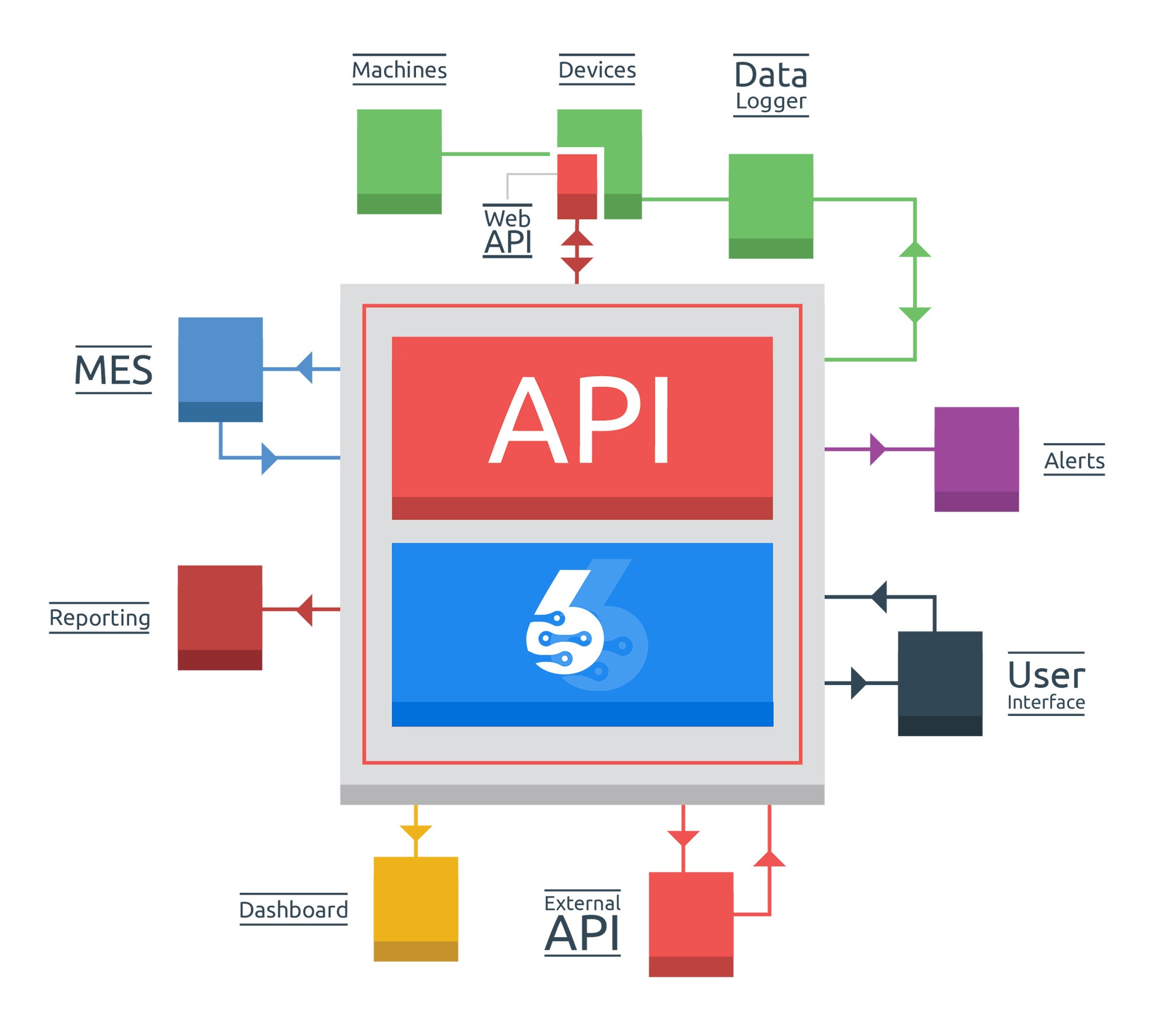
ERP integrations can create powerful improvements. They can connect online sales, carriers, customer portals, CAD tools, suppliers, payment platforms, machines, and specialist applications with the wider business process.
But integration should never be the automatic answer.
Before connecting another system, understand the ERP’s existing capabilities. Review the current process. Decide who owns the data. Keep the integration focused. Use standard functions and configuration wherever possible. Build custom connections only when they create measurable value.
SIX ERP is designed to be flexible without forcing companies into a maze of disconnected systems. It provides the tools to connect the business first — then connect the technology where it truly makes sense.